Summary: This blog explains how dental practices in the United States can reduce appointment no-shows with automated reminders. It covers SMS, email, AI voice calls, reminder schedules, patient confirmations, and easy rescheduling. It also discusses HIPAA compliance, ways to measure reminder effectiveness, and how AI voice agents can help dental teams manage appointments and reduce front desk workload.
A missed dental appointment can leave an empty chair, disrupt the day's schedule, and create extra work for the front desk team. For dental practices across the United States, these gaps can also mean lost revenue and delayed patient care.
The problem is that patients don't always miss appointments intentionally. Some forget the date, others get caught up at work, and some cannot make it but forget to call the office.
Automated dental appointment reminders help practices reduce missed visits by reminding patients at the right time and making it easier to confirm, cancel, or reschedule. Instead of relying entirely on staff to make individual calls, practices can use SMS, email, and automated voice calls to keep patients informed.
Let's look at how these systems work, how to set them up, and what dental practices should consider before choosing an automation solution.
Why Dental Appointment No-Shows Are a Problem for US Practices
Dental practices depend on a reasonably predictable schedule. When a patient doesn't arrive, the team cannot always fill that appointment at short notice. The dentist may have an empty treatment room, while another patient might be waiting days or weeks for an available slot.
Here are three common problems caused by missed appointments.
Lost Revenue and Unused Chair Time
Every appointment represents time allocated for a consultation, cleaning, or dental procedure. When a patient doesn't show up, the practice loses the opportunity to use that time for another visit.
The financial impact depends on the procedure, appointment length, and whether the practice can fill the opening. A missed hygiene appointment and a missed crown preparation, for example, won't necessarily have the same financial effect.
Repeated no-shows can make it harder to manage production targets and plan staff schedules.
Disrupted Daily Schedules and Staff Workloads
Front desk employees often have to contact patients, update appointment records, and look for someone who can fill an unexpected opening.
That work adds up. Staff members who spend hours chasing confirmations have less time for check-ins, insurance questions, billing, and patient support.
Automating routine reminders can reduce some of this administrative work and give the team more time to handle conversations that need a human touch.
Delayed Patient Care and Follow-Up Visits
Missed appointments don't only affect the practice. They can also delay preventive care and recommended treatment.
A patient who repeatedly postpones cleanings or follow-up visits may go longer without the care their dentist recommends. Patients receiving ongoing treatment may need additional coordination to get back on schedule.
A reliable reminder process helps patients remember upcoming visits and gives them an easy way to tell the practice when plans change.
What Causes Patients to Miss Dental Appointments?
Before choosing an automated reminder system, it helps to understand why patients miss appointments in the first place. Not every missed visit has the same cause, so one solution may not work for everyone.
Forgetfulness and Busy Schedules
People in the US often juggle work, family responsibilities, school schedules, and other appointments. A dental visit booked several weeks in advance can easily slip their minds.
This is one of the simplest problems to address. A reminder sent a few days before the appointment, followed by a confirmation request, gives patients a chance to check their calendars.
Scheduling Conflicts, Transportation, and Work Commitments
Sometimes, patients remember their appointments but can no longer attend. A work meeting runs late. Childcare falls through. Their car won't start. Or they simply cannot get away from work during the scheduled time.
These situations are difficult to prevent with reminders alone. However, making cancellation and rescheduling easier gives the practice an opportunity to offer that time to someone else.
Dental Anxiety and Unexpected Costs
Some patients feel nervous about dental treatment. Others may be concerned about treatment costs, insurance coverage, or out-of-pocket expenses.
They might delay contacting the office because they don't know what to say or would rather avoid the conversation.
Automated reminders cannot resolve these concerns by themselves. Still, a simple option to contact the practice or request a callback can help patients raise questions before their appointment.
How Automated Dental Appointment Reminders Reduce No-Shows
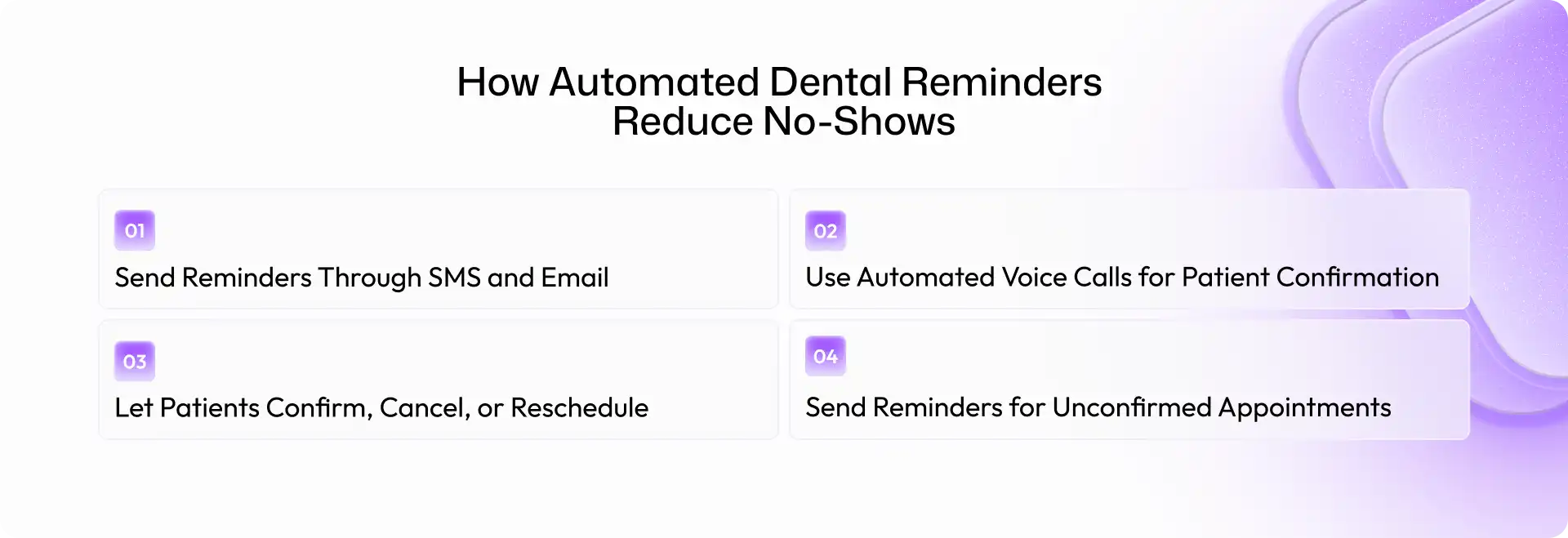
Automated dental appointment reminders use scheduling information to contact patients without requiring staff to manually send every message or make every call.
The best systems do more than announce an appointment date. They help patients respond and give the practice useful information about who plans to attend.
Send Reminders Through SMS and Email
Text messages are convenient because patients can read them quickly and check the appointment details on their phones. Email can also be useful for patients who prefer it or need more detailed instructions.
A reminder might include the practice name, appointment date and time, location, and a simple confirmation option.
For example:
Hi [Patient Name], this is a reminder of your dental appointment at [Practice Name] on [Date] at [Time]. Please reply CONFIRM to confirm or contact us if you need to reschedule.
The exact message should match the patient's communication preferences and the practice's policies.
Automated reminders also reduce the risk of staff forgetting to contact someone during a busy day. The system can send scheduled messages based on appointment records.
Use Automated Voice Calls for Patient Confirmation
Not every patient prefers text messages. Some may overlook them, have difficulty using messaging services, or simply prefer speaking with someone.
Automated voice calls provide another option. A voice reminder can announce the appointment details and ask the patient to confirm or contact the office if they need to make a change. AI voice agents can take this a step further by handling routine conversations and responding to supported scheduling requests.
Research also suggests that the best reminder channel can vary by patient group. A study in a pediatric dental setting found fewer missed appointments in its voice-message group than in its text-message group. That result shouldn't be generalized to every practice, but it highlights why offering suitable communication options matters.
The goal isn't to replace every phone call. It's to make sure patients receive reminders through channels they are likely to use.
Let Patients Confirm, Cancel, or Reschedule
A reminder that only says "Your appointment is tomorrow" leaves the next step unclear.
Instead, give patients a simple way to respond. Depending on the system, they might confirm by text, follow a scheduling link, or speak with an automated voice agent.
If a patient needs to reschedule, the system should follow the practice's scheduling rules and either offer available slots or route the request to a staff member.
This is important because an early cancellation gives the front desk more time to fill the opening. It also helps patients avoid simply missing the appointment.
Send Follow-Up Reminders for Unconfirmed Appointments
Some patients won't respond to the first reminder. That doesn't automatically mean they intend to miss the visit; they may be busy or have overlooked the message.
A practice can set up a second reminder for patients who haven't confirmed. For higher-risk appointments, a voice call or personal follow-up may be more appropriate.
For example, if an appointment is scheduled for Friday and the patient hasn't responded by Thursday morning, the system could trigger another message or flag the appointment for staff review.
The important point is to use a sensible follow-up process rather than sending repeated messages to everyone.
Best Practices for Setting Up Automated Dental Appointment Reminders
Automation works best when it fits the way a practice already operates. A complicated system with too many messages can frustrate patients and create more work instead of less.
Choose the Right Reminder Schedule
Start with a simple schedule and adjust it based on your results. A dental office might use the following as an initial setup:
- At booking: Send an appointment confirmation with the date and time.
- Three days before: Send a reminder so patients can plan ahead.
- One day before: Request confirmation or provide an easy way to reschedule.
- On the day: Send a short reminder when appropriate and consistent with patient preferences.
This is a starting point, not a universal rule. The American Dental Association's guidance on appointment confirmations recommends that practices consider the communication method and timing that work best for their patient base.
Review your attendance data regularly to see whether the schedule needs to change.
Personalize Messages Without Overcomplicating Them
Patients don't need a long message to remember an appointment. They need the correct details and a clear next step.
Use the patient's preferred name where appropriate, verify the appointment date and time, and identify the dental practice. Avoid generic messages that could be mistaken for spam.
Keep the tone friendly and professional. A simple "We look forward to seeing you" is enough.
Also, check that the scheduling system updates reminders when appointments change. Sending a reminder for an appointment that has already been cancelled is frustrating and undermines trust.
Make Confirmation and Rescheduling Easy
Patients should not have to navigate a complicated process to confirm a visit. Offer straightforward response options, such as replying to a text, using a secure scheduling link, or responding to a voice call. Make sure cancellations and rescheduling requests reach the right place.
If the software cannot complete a request automatically, it should tell the patient what to do next or notify the front desk.
Respect Patient Communication Preferences
Ask patients how they prefer to receive reminders and record their choices in the practice management system. Some patients prefer texts, while others want phone calls or email. Preferences may also differ for parents booking appointments for children.
Review contact details regularly and maintain clear procedures for handling communication requests, opt-outs, and changes to phone numbers.
A reminder system should make communication easier for patients, not turn it into another source of irritation.
Automated Reminders vs. Manual Appointment Follow-Ups
Both automated reminders and personal follow-up calls have a place in dental practice management. The right choice depends on the appointment, the patient, and the situation.
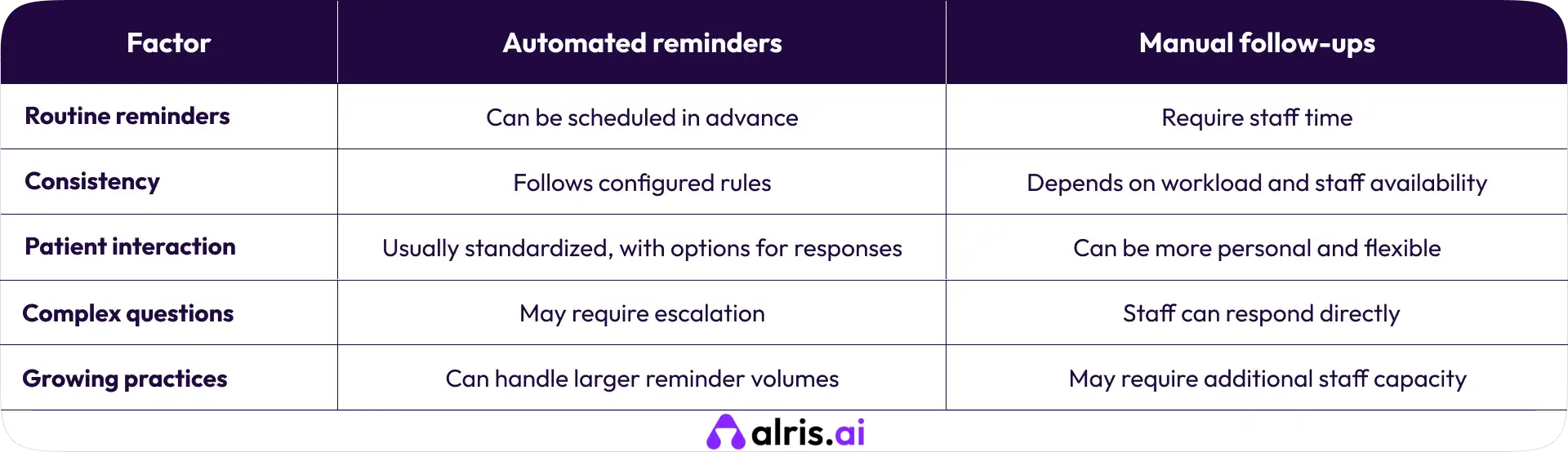
Automation is useful for routine tasks, but it shouldn't remove personal communication where it matters.
For example, a patient who regularly misses appointments may benefit from a direct call. Someone who has questions about a treatment plan or insurance coverage may also need to speak with the front desk.
A practical approach is to automate standard reminders and reserve staff time for cases that need attention.
HIPAA Compliance and Patient Privacy in Automated Reminders
Dental practices in the US should consider privacy and communication requirements when implementing automated reminders.
The US Department of Health and Human Services explains that appointment reminders are permitted under the HIPAA Privacy Rule as part of treatment. However, practices should use reasonable safeguards to protect patient information.
That means limiting the details included in voicemail messages and texts, checking recipient information, controlling access to patient data, and evaluating the security of any reminder platform.
If a technology vendor handles protected health information on behalf of a covered dental practice, the practice should assess the vendor's HIPAA obligations and whether a business associate agreement is required.
Practices should also review applicable federal and state requirements for automated calls and text messages, including consent and opt-out rules where relevant. HIPAA permission alone does not settle every question about whether a particular call or text is allowed.
For guidance, consult the HHS appointment reminder FAQ and the American Dental Association's appointment confirmation guidance.
How AI Voice Agents Can Help Dental Practices Manage Appointments
Traditional reminder software is useful for sending scheduled messages. AI voice agents can add another layer by handling routine conversations over the phone.
Depending on their capabilities and integration with the practice's scheduling system, they can make appointment reminder calls, ask patients to confirm visits, answer basic scheduling questions, and help patients request a new appointment time.
This can be particularly useful for busy practices that receive many calls while staff members are checking in patients or managing the front desk.
For example, a patient who cannot attend Friday's appointment could respond to a voice agent and request another time. The system could help with rescheduling if it has the necessary scheduling access, or route the request to a staff member.
Alris AI offers AI voice agents designed to handle inbound and outbound calls and support appointment-related workflows. Dental practices exploring this approach can review the Alris AI dental clinic automation solution to understand how it may fit their needs.
Before choosing a platform, check its integration options, escalation process, privacy safeguards, and ability to handle the scheduling tasks your practice actually needs.
Final Thoughts: Build a More Reliable Dental Schedule With Automation
Reducing dental appointment no-shows starts with clear communication and a process patients can follow easily. Automated reminders help practices stay consistent, while confirmation options and flexible rescheduling give patients more control when plans change.
Start with a simple reminder schedule, measure your results, and use personal follow-ups for patients who need extra support. As your practice grows, automation can help manage routine calls and messages without putting every task on your front desk team.
The goal isn't to eliminate every missed appointment. It's to make attendance easier, fill more available chair time, and help patients stay on track with their dental care.
Frequently Asked Questions (FAQs)
1. What is the best way to remind patients about dental appointments?
There is no single best channel for every patient. SMS is convenient, email can provide written details, and voice calls may work better for patients who prefer speaking or are less likely to respond to texts. Offering a choice and tracking attendance by channel can help practices find the right mix.
2. Can automated reminders reduce dental appointment no-shows?
Yes, automated reminders can help reduce missed appointments by making dates easier to remember and giving patients a way to confirm or reschedule. However, results vary. Reminders are less effective when patients face barriers such as transportation problems, scheduling conflicts, or treatment concerns.
3. Are automated dental appointment reminders HIPAA-compliant?
They can be used in a HIPAA-compliant workflow, but compliance depends on how the system is configured and operated. Practices should evaluate data security, vendor responsibilities, patient communication preferences, and applicable privacy and consent requirements.
4. Can AI voice agents confirm and reschedule dental appointments?
Yes, when the voice agent is configured for those tasks and has the required scheduling integration. It may confirm appointments, handle routine requests, or help patients find another time. Requests beyond its capabilities should be transferred to the front desk.