Summary: Front desk automation helps medical offices reduce repetitive administrative work, manage patient calls, simplify appointment scheduling, and send timely reminders. This guide explains which tasks US medical practices should automate first, how AI receptionists and workflow automation can improve daily operations, and what to consider when choosing software. Learn how to prioritize workflows, protect patient information, and give staff more time to focus on patient care.
Medical office front desks handle a lot more than greeting patients. Staff answer phone calls, schedule appointments, send reminders, collect patient information, and manage routine administrative requests. When several of these tasks arrive at once, calls go unanswered, patients wait longer, and the workload keeps piling up. Front desk automation helps medical practices manage repetitive administrative tasks with less manual effort.
But automating everything at once isn't the best approach. Start with the tasks that consume the most staff time, happen frequently, and follow a predictable process.
For many US medical offices, that means looking first at appointment scheduling, incoming phone calls, and appointment reminders. Once those workflows are running smoothly, practices can move on to patient intake, insurance verification, and follow-up tasks.
Here's how to decide what to automate first, what to look for in the software, and how AI can help your front desk team work more efficiently.
What Is Front Desk Automation in a Medical Office?
Clinic front desk automation uses software to handle routine administrative work that medical receptionists and office managers would otherwise perform manually. It can include appointment booking, automated reminders, digital intake forms, call handling, and patient request management.
The goal isn't to remove the human element from healthcare. It's to reduce repetitive work, so staff have more time to help patients who need personal attention.
How medical front desk automation works
A medical practice might use several tools to automate its daily operations. An appointment scheduling system lets patients request available time slots. A reminder tool sends appointment confirmations by text or email. An AI receptionist can answer routine phone calls, collect basic information, and route requests to the right person.
Some systems also connect these activities to an electronic health record (EHR) or practice management platform. When integrations are configured correctly, information can move between systems without staff repeatedly entering the same details.
The best setup depends on the practice's size, existing software, call volume, and administrative workload.
Which tasks can be automated and which still need staff?
Tasks with clear rules and predictable steps are usually good candidates for automation. Appointment reminders, routine scheduling requests, basic office information, and digital form collection are common examples.
Other tasks need human judgment. Clinical questions, urgent symptoms, complicated billing disputes, and sensitive patient concerns should be routed to qualified staff.
A useful rule is simple: automate the process, not the responsibility for making decisions that require professional judgment.
What Should Medical Offices Automate First?
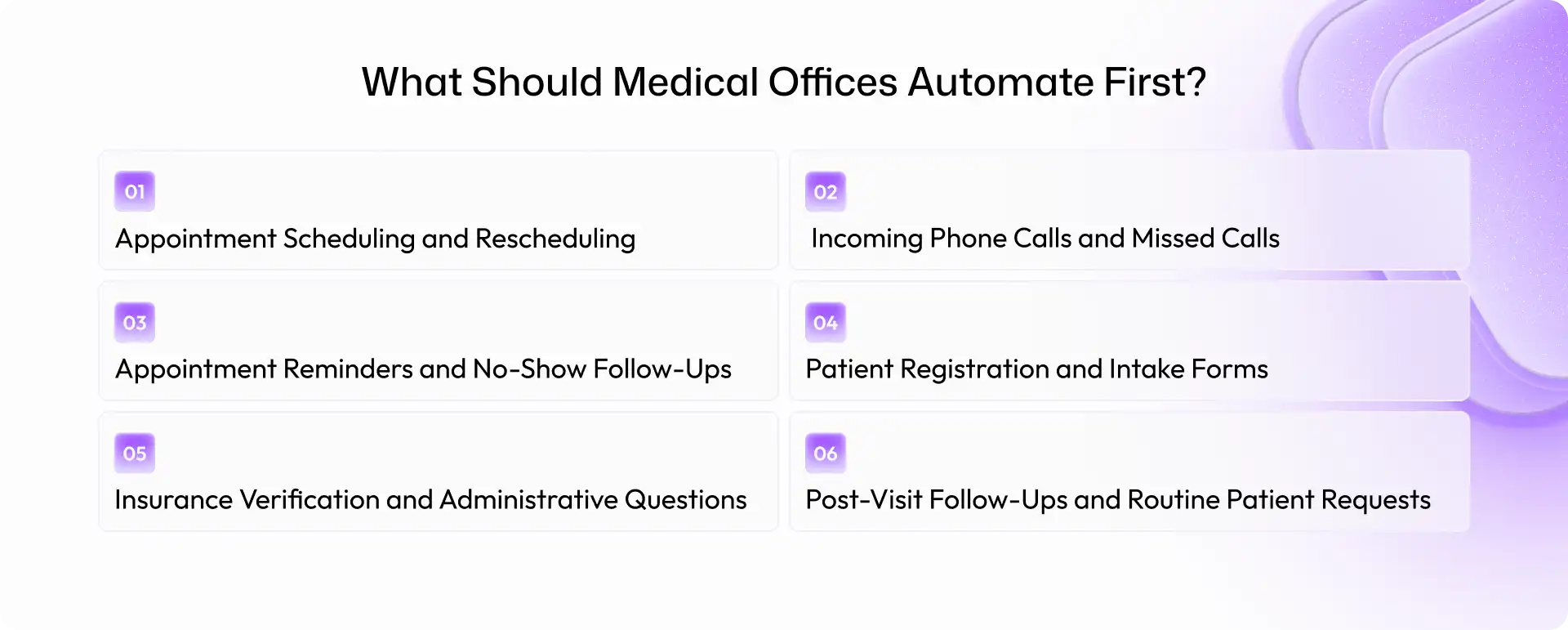
The best starting point is usually a task that happens frequently, takes staff away from other responsibilities, and can be handled using clear rules. Here are six areas worth evaluating.
1. Appointment Scheduling and Rescheduling
Scheduling is one of the most practical places to begin with medical office front desk automation. Patients call to book visits, change appointment times, ask about availability, or cancel existing bookings. Each request takes time, particularly when the front desk is already busy.
Automation can allow patients to request or book appointments online, depending on the practice's scheduling setup. AI voice agents can also handle supported scheduling requests through conversations rather than requiring every patient to navigate a website.
A well-configured workflow can help with:
- Booking routine appointments based on approved availability.
- Handling appointment changes and cancellations.
- Answering basic questions about office hours and appointment procedures.
- Routing requests that require staff approval.
For example, imagine a patient calls during a busy morning to reschedule a routine visit. Instead of waiting for a receptionist to finish checking in another patient, an automated system may be able to handle the request directly.
The important part is integration. The system must use accurate scheduling information and follow the practice's rules. Otherwise, double bookings and incorrect appointment details can create more work instead of less.
2. Incoming Phone Calls and Missed Calls
Phone calls are another strong candidate for automation, especially for practices that receive frequent appointment inquiries.
A receptionist might be checking in a patient, answering a billing question, and responding to another caller within the same few minutes. Something has to wait. Sometimes that means a call goes unanswered.
An AI receptionist for medical offices can help manage routine calls when staff is occupied, or the office is closed. Depending on its capabilities and configuration, it can answer common questions, collect relevant details, handle supported appointment requests, or transfer callers to a human team member.
Useful call-handling workflows include:
- Answering common questions about office hours and location.
- Handling routine appointment inquiries.
- Capturing callback requests when staff is unavailable.
- Routing billing, clinical, or other complex questions appropriately.
- Providing an appropriate escalation path for urgent concerns.
Consider a small primary care practice with two front desk employees. Both are helping patients in person when several calls come in. An AI phone agent can help answer eligible calls instead of leaving every caller on hold.
That doesn't mean every call should be handled by AI. Patients may need a person, particularly when discussing sensitive information or complicated concerns. A reliable system should make reaching a staff member straightforward.
3. Appointment Reminders and No-Show Follow-Ups
Missed appointments create scheduling gaps and leave staff with another round of calls to make. Patients forget appointments, overlook messages, or realize too late that they need to reschedule.
Automated appointment reminders can help practices communicate more consistently. Depending on the system, reminders may be sent by SMS, email, or voice call before a scheduled visit.
A useful workflow might include:
- Sending a reminder several days before an appointment.
- Requesting confirmation from the patient.
- Sending a follow-up reminder closer to the visit.
- Providing a clear way to cancel or request a new time.
- Notifying staff when a patient needs help.
For example, if a patient cannot attend an appointment, a reminder system may direct them to a rescheduling option. Staff can then offer the released slot to another patient according to the practice's normal process.
The goal isn't to eliminate every no-show. It's to make communication more consistent and give patients an easier way to respond.
In the United States, appointment reminders are generally permitted under the HIPAA Privacy Rule, but practices should still limit the information disclosed and respect reasonable requests for confidential communications.
Patient registration often involves collecting demographic details, contact information, insurance information, and other administrative details before a visit. When patients complete everything at the front desk, staff must divide their attention between paperwork and people waiting to check in.
Digital intake can move some of that work earlier in the process.
Practices can use online forms to collect information before an appointment, send reminders to complete missing fields, and route submitted information for review. Depending on the software, approved information may also be transferred into the practice's existing system.
This can help reduce repetitive data entry and make check-in more manageable.
However, automation shouldn't mean accepting every submission without review. Staff may still need to verify information, resolve incomplete forms, and confirm details that affect registration.
Start with the forms patients complete most often. A practice that sees many returning patients, for example, may benefit from streamlining demographic updates before attempting to automate every part of patient onboarding.
5. Insurance Verification and Administrative Questions
Insurance-related work can consume a surprising amount of front desk time. Staff may need to collect insurance details, check eligibility, follow up on missing information, and explain basic administrative procedures.
Some of these steps can be automated through eligibility tools, workflow rules, and integrations with insurance or practice management systems. A practical workflow might:
- Collect insurance information before the appointment.
- Flag missing or outdated details.
- Initiate eligibility checks through a supported system.
- Notify staff when information needs review.
- Route complex coverage questions to the billing team.
The important distinction is between checking information and making promises about coverage. An eligibility result doesn't necessarily guarantee that a service will be covered or that a claim will be paid.
For that reason, start by automating information collection and routine checks. Keep exceptions, disputed charges, and complicated coverage questions with trained staff.
This workflow may be more difficult to implement than appointment reminders because it depends on payer access, software compatibility, and the practice's existing processes. It may be better as a second-phase project rather than the first automation initiative.
6. Post-Visit Follow-Ups and Routine Patient Requests
Front desk work doesn't end when a patient leaves the office. Staff may still need to respond to requests for records, provide referral status updates, schedule follow-up visits, or send administrative reminders.
These requests often follow a predictable process, making them useful candidates for automation.
For example, a workflow could acknowledge a records request, create a task for the appropriate team member, and notify staff when the request needs attention. A separate workflow could remind patients to schedule a recommended follow-up visit, where appropriate.
AI voice agents may also handle routine inquiries and collect details for a callback.
There is an important boundary here: clinical questions should not be treated as ordinary administrative requests. Questions about symptoms, medication changes, test results, or treatment decisions should follow the practice's clinical escalation procedures.
Start by automating task creation, status updates, and routine communication. These smaller changes can make the front desk more organized without handing sensitive decisions to software.
How to Prioritize Front Desk Tasks for Automation
Not every task deserves the same level of attention. Before purchasing new software, review how your front desk actually spends its time.
Use four criteria to choose the best starting point:
- Frequency: How often does the task occur each day or week?
- Staff time: How many minutes does each request take, including follow-up work?
- Predictability: Can the task be completed using clear rules and approved information?
- Risk: What happens if the automation makes an error or fails to complete the task?
A simple prioritization table can help.
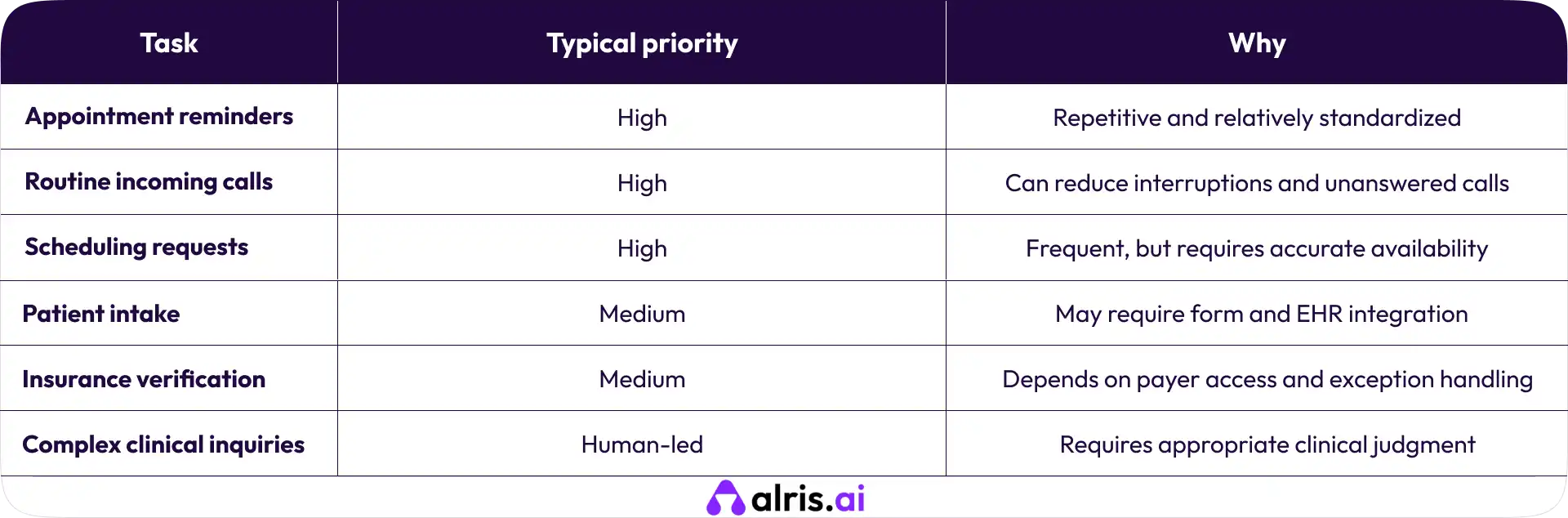
These are starting recommendations, not universal rankings. A practice that spends hours on intake may need to prioritize forms, while an office with a high volume of unanswered calls may get more value from an AI receptionist.
Before implementation, record a baseline: call volume, missed calls, time spent on repetitive tasks, and appointment confirmation rates. Review the same measures after launch to see whether the change is helping.
Benefits of Automating a Medical Office Front Desk
When front desk automation is implemented around real operational needs, it can make daily work easier to manage. The main benefits include:
- Less repetitive administrative work: Staff spend less time making routine calls, sending reminders, and entering the same information repeatedly.
- More consistent communication: Automated workflows can respond to routine requests even when staff are busy, subject to system availability and configuration.
- Better appointment management: Easier confirmations and rescheduling can help practices manage their schedules.
- More time for patients: Receptionists can focus on check-in, patient concerns, and requests that need personal attention.
- Clearer operational visibility: Call logs and workflow reports can help managers identify recurring problems.
These benefits aren't automatic. Poor integrations, confusing workflows, and inaccurate information can create additional work. The aim should be to improve the entire process, not simply add another tool.
What to Look for in Medical Front Desk Automation Software
The right software should fit your existing operations rather than force your team to rebuild everything around it.
EHR and practice management system integration
Check whether the software integrates with your existing EHR or practice management platform. Confirm which actions it can perform, whether information syncs in real time, and how errors are handled.
A system that cannot access accurate appointment information may be useful for answering basic calls but unsuitable for confirming bookings.
If a system creates, receives, maintains, or transmits protected health information on behalf of a covered practice, its role and obligations under HIPAA must be evaluated. Review access controls, security safeguards, audit logging, data retention, and applicable business associate agreements.
Don't rely on a vendor's marketing statement alone. Ask how patient information is protected and what responsibilities belong to the practice.
Human handoff and escalation options
Patients should have a clear way to reach a person when automation cannot resolve a request. Look for call transfers, callback requests, staff notifications, and defined escalation rules.
This matters especially when a patient raises a clinical concern or an urgent issue.
Reporting, audit trails, and workflow monitoring
Look for reports showing call outcomes, unresolved requests, scheduling activity, and failed workflow steps. These records help the practice identify problems and decide what to improve next.
How Alris AI Can Help Automate Medical Front Desk Workflows
Medical practices looking to reduce repetitive calls and administrative work can explore AI-powered voice agents and workflow automation through Alris AI.
Depending on the configured workflow and available integrations, AI voice agents can support routine phone interactions, collect relevant information, and help route requests to the appropriate team. Workflow automation can also help organize follow-ups and routine administrative tasks.
The practical starting point is to identify where calls are being missed or staff time is being lost, then assess whether an automated workflow can address that problem safely.
Before selecting a solution, confirm its actual capabilities, integration requirements, and safeguards for handling patient information.
Final Thoughts: Start With One Front Desk Workflow
Medical front desk automation doesn't have to begin with a major technology project. For many practices, the sensible first step is to improve appointment reminders, routine phone calls, or scheduling.
Identify the task that consumes the most time, establish a baseline, and choose software that works with your existing systems. Keep human support available for situations that need judgment, and review the results before expanding.
The goal is straightforward: less time spent on repetitive administration and more time available for patients.\
If your practice is exploring AI-powered phone handling and workflow automation, visit Alris AI to learn more about the available options.
Frequently Asked Questions (FAQs)
1. What is the best way to automate a medical office front desk?
Start with a repetitive task that consumes significant staff time, such as appointment reminders, routine phone calls, or scheduling requests. Measure its current performance, choose compatible software, and test the workflow before expanding automation.
2. Can AI answer phones for a medical office?
Yes. AI voice agents can answer routine calls, provide approved office information, collect details, and support eligible scheduling requests when configured to do so. Practices should establish clear escalation procedures for clinical questions, urgent concerns, and requests that require human judgment.
3. Is medical front desk automation HIPAA compliant?
It can be implemented in a way that supports HIPAA compliance, but compliance is not guaranteed simply by using automation software. Practices must evaluate the vendor's role, applicable agreements, security controls, and how protected health information is handled.
4. Can a small medical practice automate its front desk?
Yes. Smaller practices can start with one or two workflows, such as appointment reminders or routine call handling. The best starting point is the task that creates the most friction for staff and patients, provided it can be automated reliably.